In a campaign's To row, choose who it goes to. The count beside each option updates as you choose.
Where to find it
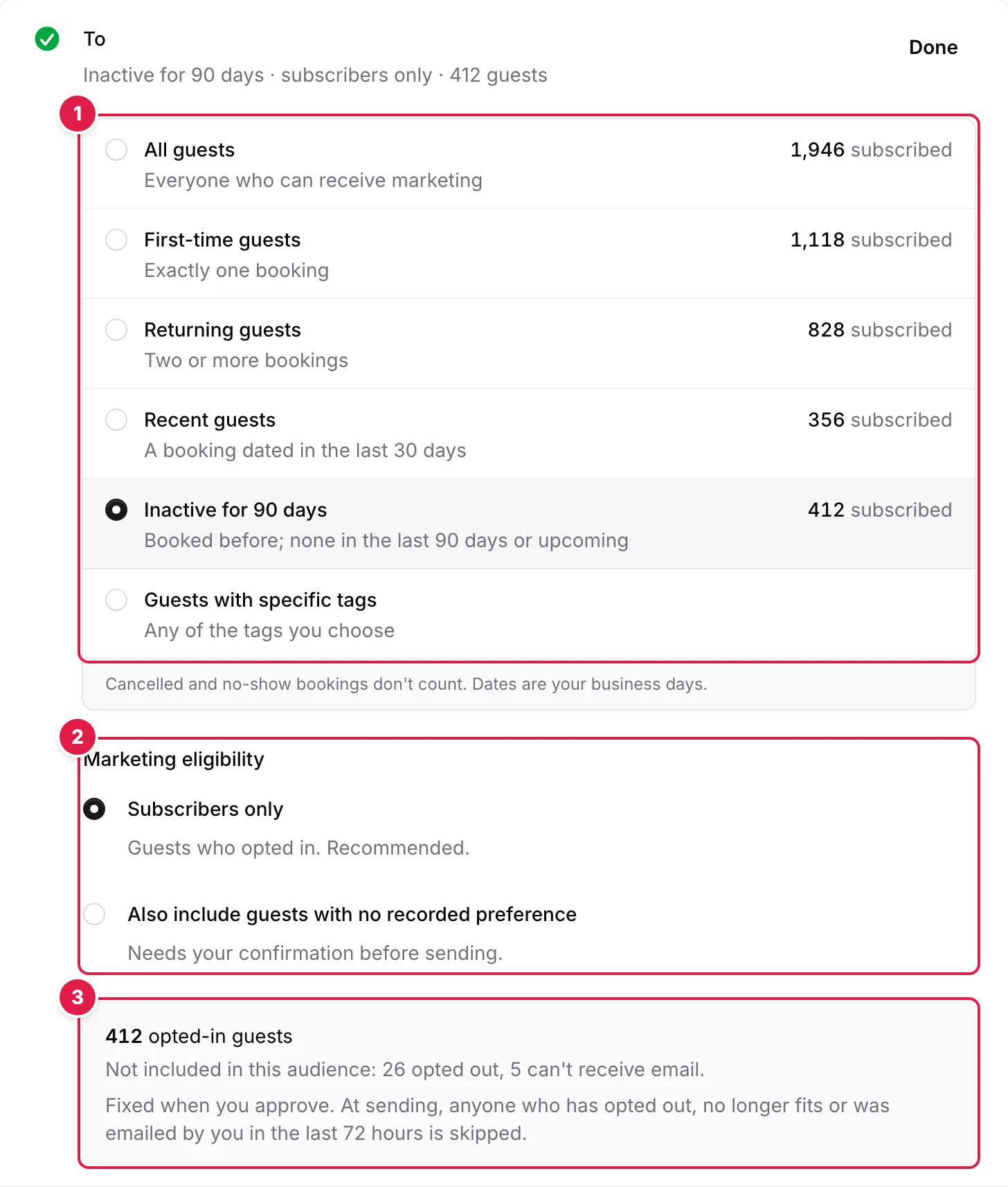
- Choose a preset from booking history, or guests with specific tags
- Marketing eligibility: Subscribers only is recommended
- Who it goes to now, and who is never included
Audiences#
- All guests — everyone who can receive marketing
- First-time guests — exactly one booking
- Returning guests — two or more bookings
- Recent guests — a booking dated in the last 30 days
- Inactive for 90 days — booked before, with none in the last 90 days and nothing upcoming
- Guests with specific tags — any of the tags you choose, for example VIP or Locals
Audiences count bookings, past and upcoming: cancelled and no-show bookings don't count, and dates are your business days. To use tags, add them to guests in Guests first.
Marketing eligibility#
- Subscribers only — guests who opted in. Recommended
- Also include guests with no recorded preference — guests who haven't opted in or out. Needs your confirmation before sending
Guests who opted out, guests whose address bounces or who reported a marketing email as spam, and guests without an email address are never included.
Guests with no recorded preference#
TableGo has no recorded marketing consent for these guests, so your restaurant must have a lawful basis to email them, including meeting any applicable consent or soft opt-in requirements. If you include them, TableGo shows how many there are and asks you to confirm.
- 1
Read the notice
It shows how many guests in this audience have no recorded marketing preference.
- 2
Tick the box to confirm your restaurant is entitled to email them
Only an Owner or Manager can confirm.
You should see: Confirmed for this campaign and this audience.
The confirmation covers this campaign and this audience only. If you change the audience, confirm again.
Who's included#
Under the audience, TableGo shows how many opted-in guests it reaches, how many with no recorded preference, and who isn't included and why: opted out, can't receive email, or no email address. The list is fixed when you approve the campaign.