For restaurant operators considering a switch
Thinking of leaving OpenTable?
TableGo Pro is £99 a month with no per-cover fees. You get Reserve with Google, table management, deposits and a guest CRM, and we’ll help you move across.
- £99/month Pro
- No per-cover fees
- No setup or cancellation fees
- Cancel anytime
Free migration help is included with Pro. Basic is free, with a 3.5% platform fee on deposit, voucher and event payments.
The cost question
Work out what you’d actually pay
OpenTable doesn’t publish UK subscription prices, and its cover fees depend on where each booking came from. So the fair comparison is your own invoice against TableGo’s flat price.
OpenTable, from its UK plans page
- Core and Pro are listed as “Contact us for pricing”.
- Cover fees apply to seated diners who find the restaurant through OpenTable’s website, app or affiliate network.
- There’s no cover fee on website bookings, phone bookings or walk-ins, or for cancellations and no-shows.
TableGo
- Pro is £99 a month, flat. No per-cover fees on any booking, wherever it came from.
- No setup or cancellation fees. Billed monthly, cancel anytime.
- Basic is free. TableGo’s fee on deposit, voucher and event payments is 3.5% on Basic and 0% on Pro. Stripe’s card processing fees apply on every plan.
Check it against your own invoice
Use the figures on your latest OpenTable invoice. We don’t assume any OpenTable rate, and nothing you type is sent or stored.
In pounds. Include any add-ons on the invoice.
Diners who found you via OpenTable’s website, app or affiliates.
In pounds, from your own agreement or invoice.
Enter all three figures to see a comparison.
An estimate from the figures you enter, comparing fees only. The TableGo figure excludes Stripe’s card processing fees on deposits and vouchers, which apply on every TableGo plan.
It doesn’t assume the diners OpenTable’s network sends you will book with you on TableGo. Marketplace bookings don’t move across automatically, and Reserve with Google is a separate source of bookings, not a replacement for them.
The product
Software built for service, not just a booking widget
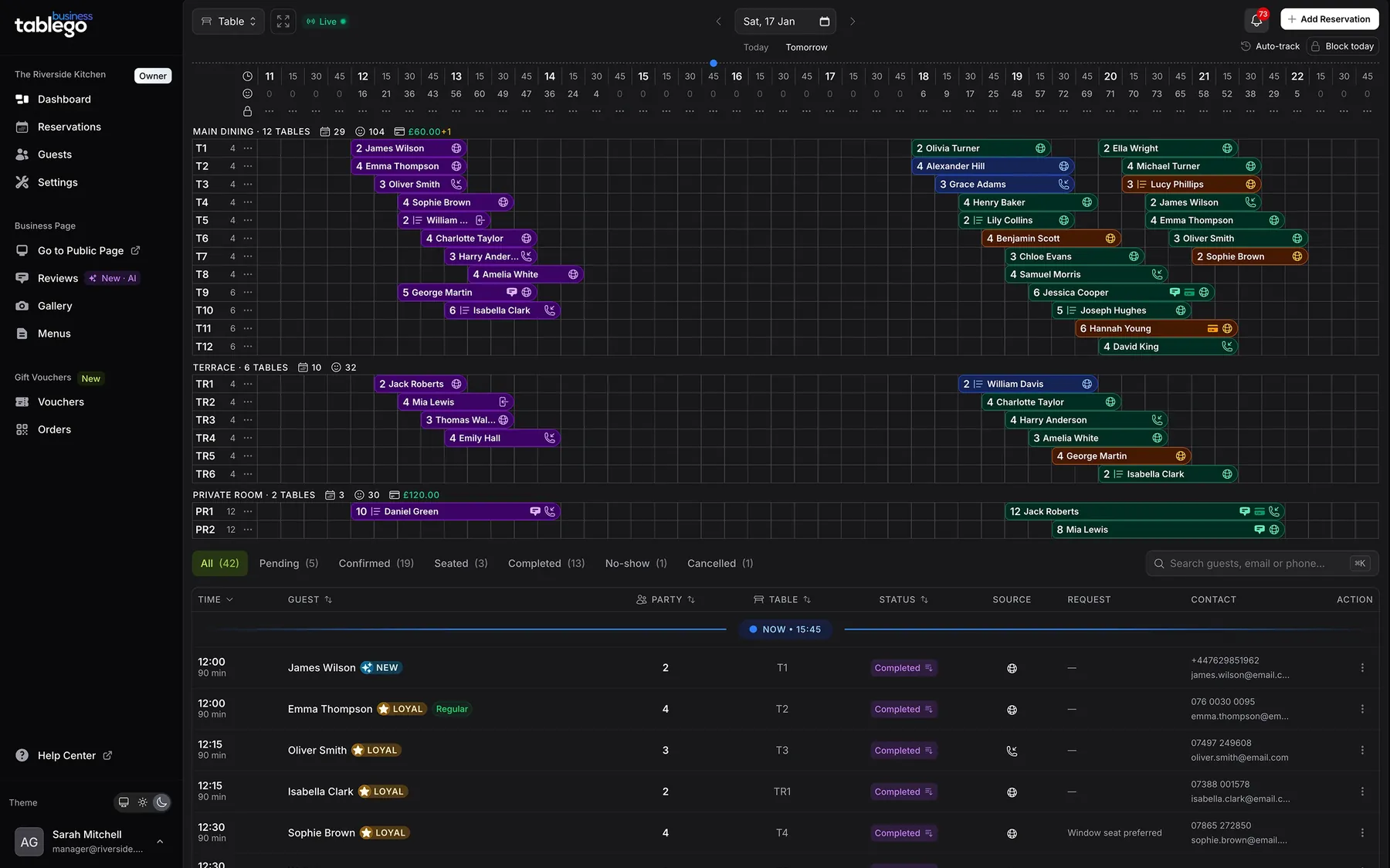
A live diary the whole team can run service from
See covers by time, add phone and walk-in bookings, and assign one or more tables from the same screen. Floor plan and table timeline views keep everyone on the same page during service.
- Covers by time slot, with phone and walk-in entry
- Tables grouped by area, such as Main Dining, Terrace and Private Room
- Team logins for managers and floor staff on Pro
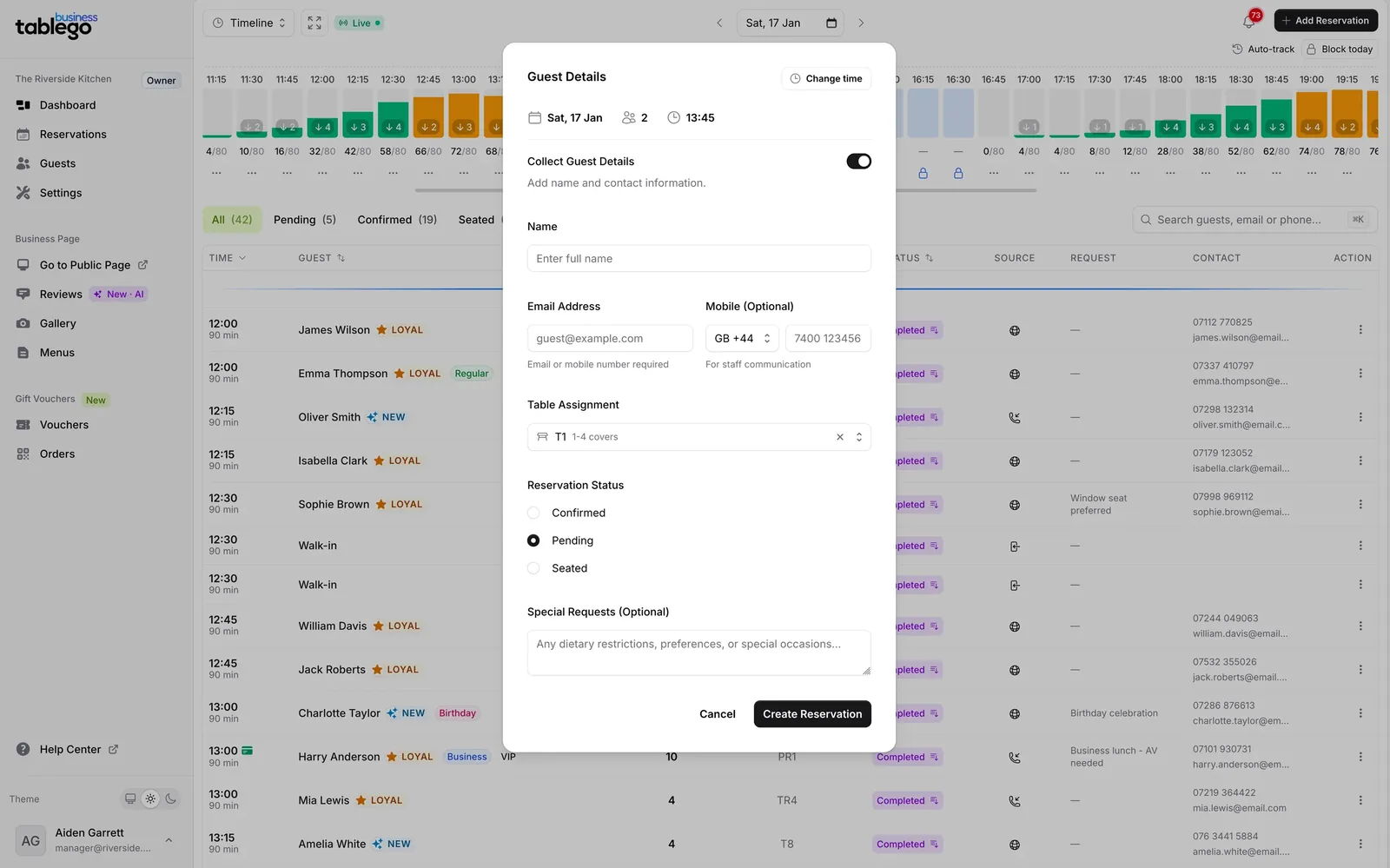
Deposits and card guarantees that protect busy nights
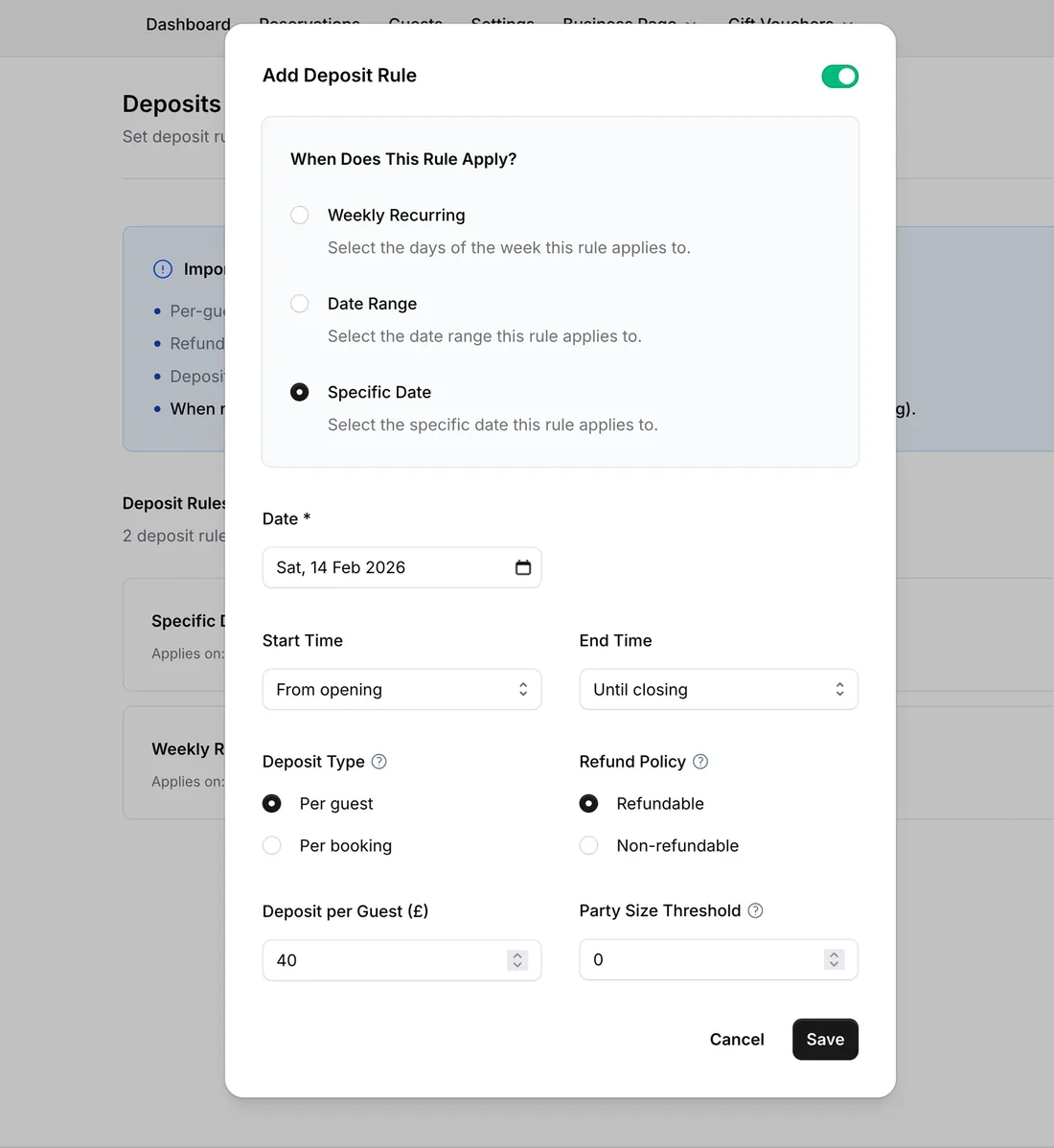
Set rules by day, time and party size, then take a Stripe deposit, or save a card at booking with a card guarantee on Pro. Pro has a 0% TableGo platform fee on these payments. Stripe’s processing fees still apply.
- Per-guest or per-booking deposits
- Refundable or non-refundable, with a party-size threshold
- Card on file with no upfront charge (Pro)
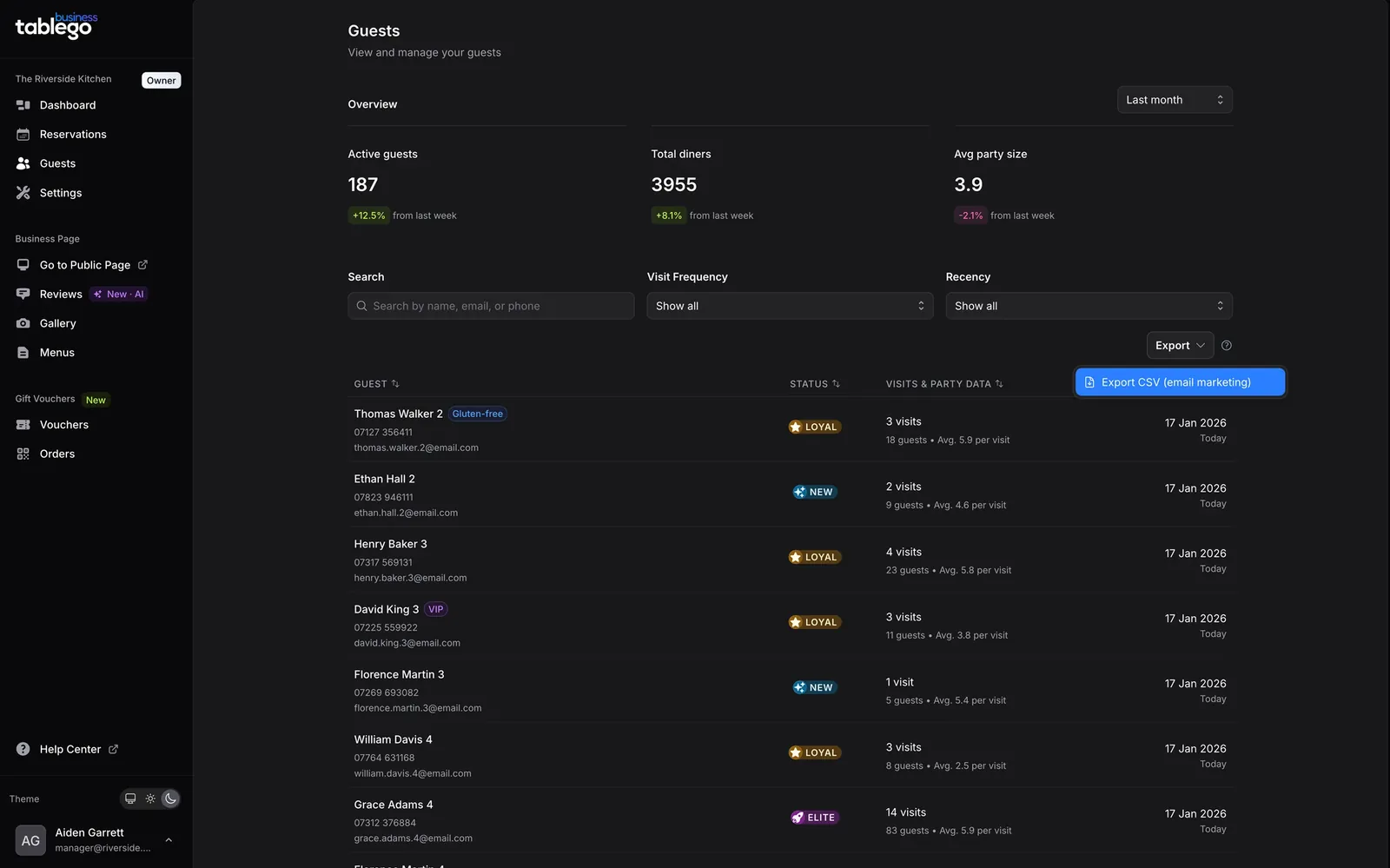
A guest CRM you can export
Every booking builds a guest profile with visit history, tags and notes. Your guest list is yours to export as CSV on Pro.
- Visit counts, party sizes and guest status
- Custom tags and notes, such as VIP or allergies
- CSV export
Also on Pro: reports and reservation analytics, gift vouchers and events with a 0% platform fee, team access, and priority support. Screenshots use demo data, not real guests.
Before you decide
Reserve with Google isn’t the same as OpenTable’s marketplace
Two different sources of bookings
Reserve with Google puts a “Reserve a table” button on your Google listing, and the booking lands in your own system. OpenTable’s marketplace is its own diner website, app and affiliate network, which is where cover fees can apply.
OpenTable connects to Google’s button too, so the real difference is the marketplace, not Google. On TableGo, Reserve with Google is included with Pro. We switch it on and help with your Google link. Timing depends partly on Google, so we’ll agree a realistic plan before you change anything.
Will you lose bookings?
Marketplace bookings stop when you leave, because the marketplace is OpenTable’s. Guests who book through your website, Google or the phone carry on once those links point to TableGo.
Look at your OpenTable reports first: how many bookings came from its marketplace, and how many came direct? If marketplace diners are a big share, run both systems side by side before you commit. We can’t promise you won’t lose any bookings, and we won’t pretend otherwise.
TableGo is likely a good fit if
- Most of your bookings come from your own website, Google, the phone or regulars.
- Cover fees, renewal terms or an unpublished price are what’s bothering you.
- You want one predictable monthly price and no per-cover fees.
OpenTable may suit you better if
- New diners from OpenTable’s marketplace are a large share of your covers, and worth the fees to you.
- You depend on an OpenTable-specific integration.
- You’d rather not manage a change while you’re at your busiest.
Side by side
TableGo and OpenTable compared
OpenTable details come from its UK plans page, checked 9 October 2026. OpenTable can change its terms, so confirm current details with it.
Making the move
Switching systems shouldn’t mean starting from scratch
Free migration help is included with Pro. This is the usual order of work, and we adapt it to your restaurant.
We review your current set-up
Tables and areas, opening hours, booking rules, deposits, and the integrations you rely on today.
Guest data comes across where it can
We help with guest-data exports and imports where OpenTable’s tools support it and you’re entitled to use the data.
We set up the restaurant with you
Tables, booking rules, hours and deposit or card-guarantee rules, checked against how you work now.
We help switch your links
Your website booking button or widget, your Google Business Profile and your Reserve with Google set-up.
We support your team through onboarding
Hands-on help for managers and floor staff, and priority support on Pro.
Questions owners ask
Before you switch
How do TableGo and OpenTable booking fees differ?
TableGo charges no per-cover fees on any plan. Pro is £99 a month, flat, whether a booking came from your website, Google, the phone or tablego.uk. OpenTable doesn’t publish UK subscription prices. Its plans page says cover fees apply to seated diners who find you through OpenTable’s website, app or affiliate network, and not to website bookings, phone bookings, walk-ins, cancellations or no-shows. Which is cheaper depends on your OpenTable plan, your fee rate and how many covers come through its network, so check it against your own invoice.
What happens to bookings that came through OpenTable’s marketplace?
They stop when you leave, because the marketplace is OpenTable’s own diner network. Guests who book through your website, Google or by phone carry on as normal once those links point to TableGo. Before you switch, check your OpenTable reports for how many bookings came from its marketplace and how many came direct. If marketplace diners are a big share of your covers, you can run both systems side by side first. Existing future bookings don’t move automatically, and we’ll agree with you how to handle them.
Can guests still reserve via Google?
Yes. Reserve with Google is included with Pro. We switch it on for your restaurant and help you set up your Google Business Profile link. Timing depends partly on Google, so we’ll agree a realistic plan with you before you change anything. In the meantime your Google profile can point to your TableGo booking page.
Can existing guest data be imported?
Where you can export your guest list from OpenTable and you’re entitled to use it, we help you import it from a CSV file. Names, contact details and notes come across when they’re in the file. OpenTable reviews, booking history and integrations don’t transfer automatically. Check what OpenTable lets you export, and your own data-protection obligations as the restaurant.
How long does setup typically take?
Setting up hours, tables and booking rules is self-service, and a booking page can be live the same day. A full move with guest import, deposits, website links and Google takes longer, and it depends on your set-up and your OpenTable renewal date. We’ll give you a realistic timeline in the demo.
Are there contracts, setup fees or cancellation fees?
No contract, no setup fee and no cancellation fee. Basic is free. Pro is £99 a month, billed monthly, and you can cancel anytime. OpenTable’s plans page says its standard contract is one year and auto-renews, so check your own renewal date and notice period before you plan a switch.
What happens to deposit and voucher processing fees?
Stripe charges card processing fees on every TableGo plan, for example 1.5% + 20p per UK card payment. On top of that, TableGo’s own platform fee on deposits, gift vouchers and event payments is 3.5% on Basic and 0% on Pro. So Pro removes TableGo’s fee on those payments, but not Stripe’s.
See how your OpenTable workflow would look in TableGo
Give us 15 minutes. Bring your floor plan, your booking rules and your last invoice, and we’ll show you the same restaurant running on TableGo.
- Start on the free Basic plan, then upgrade to Pro when you’re ready.
- Month to month. No setup fee, no cancellation fee.
- Run TableGo alongside OpenTable while you decide.
