Marketing lets you email your guests from TableGo: a new menu, an offer, an event or a quiet midweek night. Campaigns come from your restaurant's own domain and go only to guests who can receive them, and each one has a report with what was delivered and the bookings recipients made afterwards.
Where to find it
Who can use it#
- Marketing is part of the Growth plan, £199 a month per venue: everything in Pro, plus Marketing
- Owners and Managers write, approve and send campaigns, and manage the sender settings. Staff and Viewers don't see Marketing
- On Basic and Pro, Marketing in the main menu shows what's included. The owner can upgrade to Growth from there
Tip
Get ready to send#
- 1
Connect your domain
In Sender settings, enter your restaurant's domain, for example yourrestaurant.co.uk. Campaigns come from an address on it, such as news@yourrestaurant.co.uk.
- 2
Add the DNS records
Add the records TableGo shows where your domain is managed. TableGo checks them automatically; most domains verify within an hour.
You should see: Sender settings shows Ready to send.
- 3
Write your first campaign
Start from a template while you wait. It can be sent once your domain is verified.
The Marketing page#
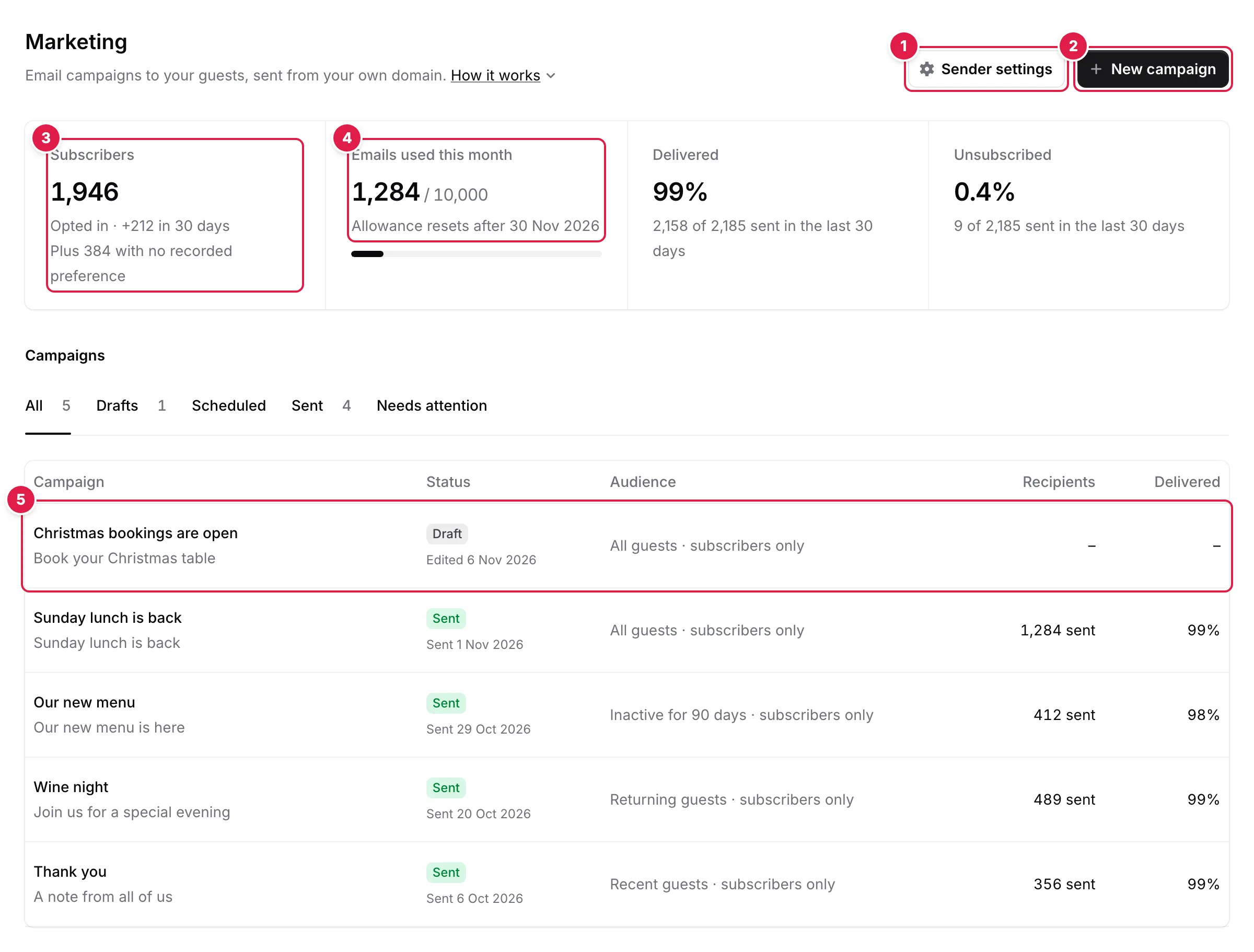
- Sender settings: your sending domain and its DNS records
- New campaign: start from a template
- Subscribers: guests who opted in to your emails
- Emails used this month, out of your monthly allowance
- Campaigns: open a Draft to finish it, or a sent one for its report
- Subscribers — guests who opted in and can receive email, with how many joined in the last 30 days and how many more have no recorded preference
- Emails used this month — out of your 10,000 for the calendar month
- Delivered and Unsubscribed — for everything sent in the last 30 days. Below 100 emails they show as counts, from 100 as percentages
Below them, Campaigns lists every campaign with its status, audience, recipients and deliveries. Filter it by Drafts, Scheduled, Sent or Needs attention. How it works, next to the page description, shows the four steps and a 45-second film.
Note