For restaurant owners · Christmas and New Year 2026
Christmas bookings without the chaos.
Restaurant booking software to manage festive bookings, deposits and gift vouchers.
- Deposits and gift vouchers are on the free Basic plan
- Pro is £99 a month, with no TableGo platform fee
- No per-cover fees, no setup fee
On Basic, TableGo’s platform fee is 3.5% of deposit and voucher payments. On Pro it’s 0%. Stripe’s processing fees apply on every plan.
Before the rush
What to set up for the festive weeks
These are the settings restaurants use to cope with December. Each one is live in TableGo today, and each says which plan it’s on.
- Basic and Pro
Deposits for the dates that matter
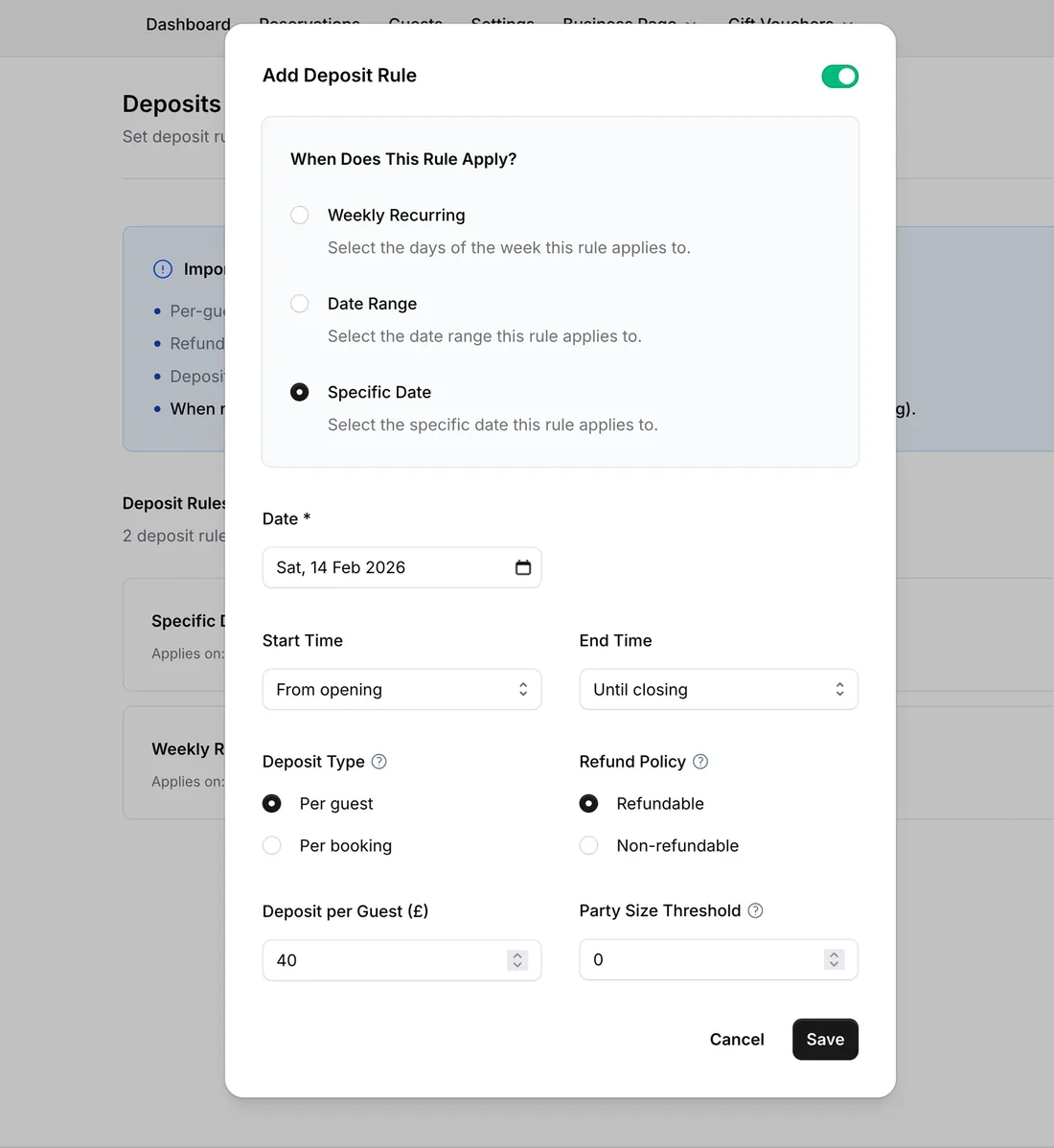
Ask for a deposit on specific dates, a date range or certain weekdays, within set times, above a party size, or for one service period. Charge per guest or per booking, refundable or not.
- Pro
Card guarantees against no-shows
Save a card at booking without taking payment. Set late-cancellation and no-show fees, and charge them from the reservation if a guest doesn’t turn up.
- Basic and Pro
Rules that suit large parties
Set minimum and maximum party size, how much notice you need, when guests can no longer change or cancel, and a longer dining time for larger parties.
- Basic and Pro
Festive opening hours
Add special hours for days like Christmas Eve, and block dates when you’re closed. You can show guests the reason, and repeat a closure every year.
- Basic and Pro
A bookable festive service
Create a named service period, such as a festive set-menu lunch, with its own booking window, dining time and party-size limits.
- Pro
Tables and floor plan
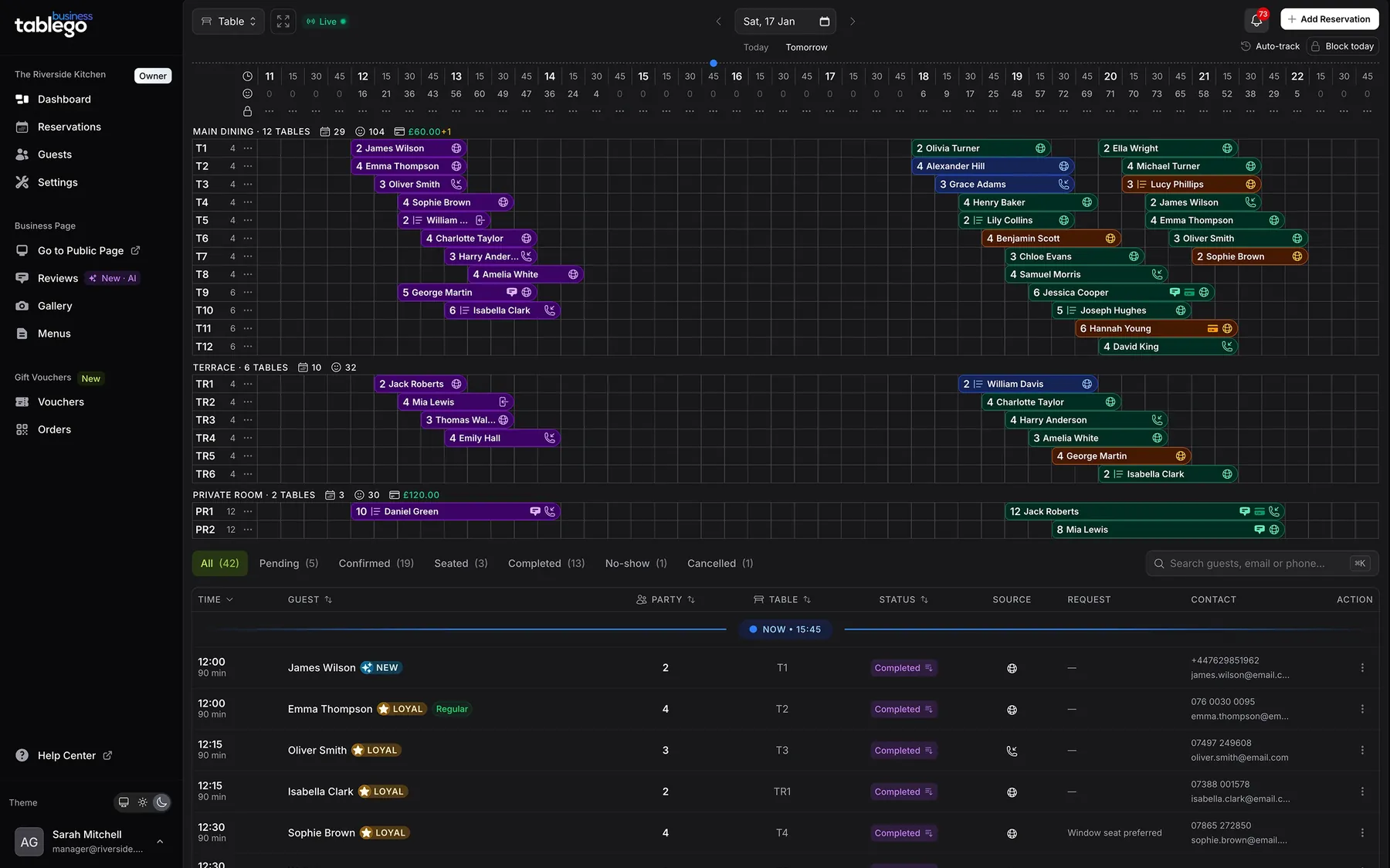
Assign tables, group them by area such as Main Dining or Private Room, and see the whole day on a table timeline.
How a festive booking works
From enquiry to a protected table
Set your festive rules
Add a deposit, or a card guarantee on Pro, for the dates you choose. When rules overlap, the most specific one applies: a specific date beats a date range, which beats a weekly rule.
Guests book and pay online
The guest pays the deposit or saves their card as part of booking, and that confirms the table. Payment goes through your own Stripe account.
Phone bookings get a payment link
Take the booking in the diary, then email the guest a secure link to pay the deposit or save their card. It works for any booking where you have their email address.
Cancellations and no-shows are handled by your rules
A refundable deposit is refunded automatically if the guest cancels before your cancellation cut-off. On Pro, with a card guarantee, you can charge your late-cancellation or no-show fee from the reservation.
Gift vouchers
Sell gift vouchers while guests are looking for them
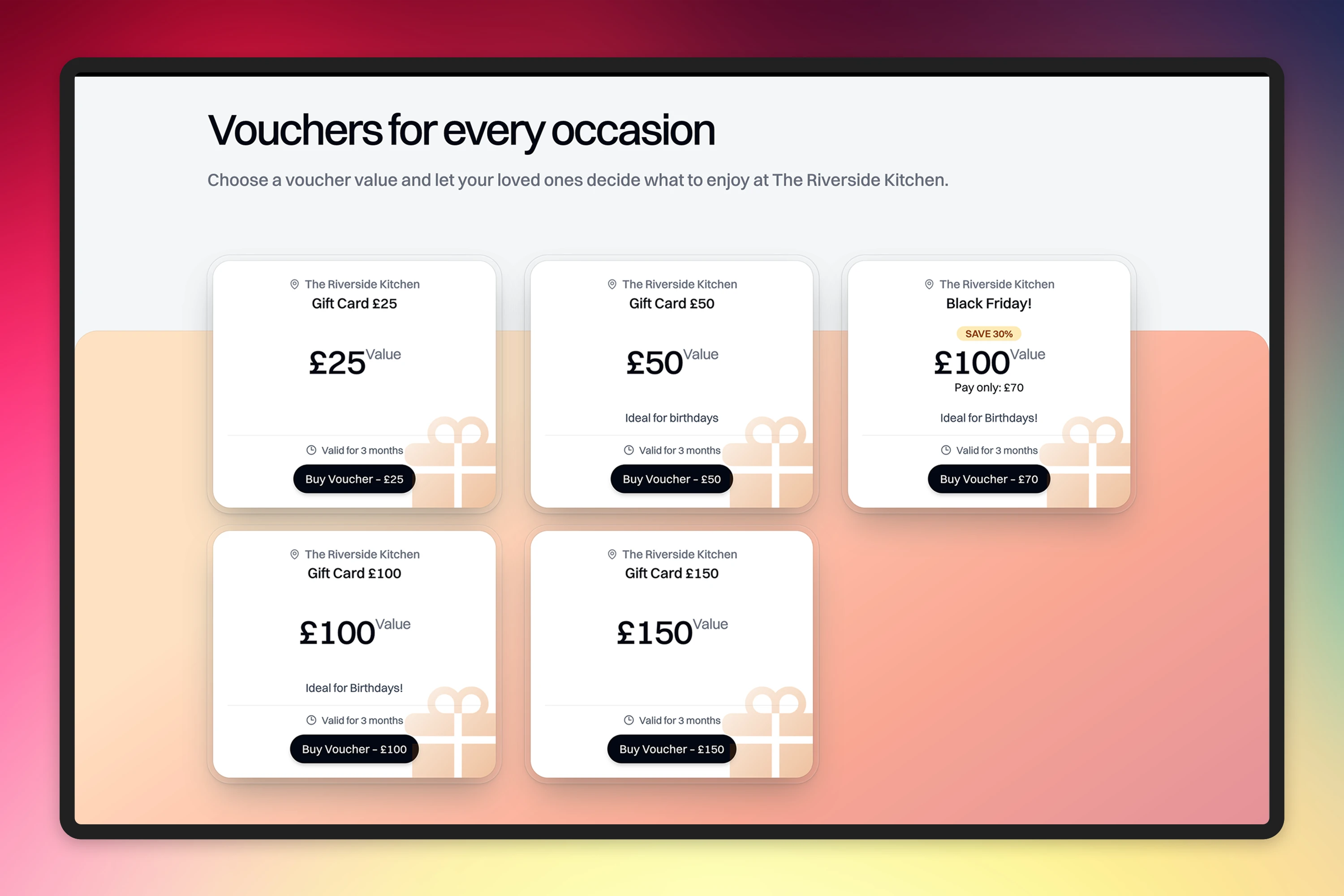
Gift vouchers are on the free Basic plan as well as Pro. Set them up once, and guests can buy them from your TableGo page.
- Fixed amounts, or flexible amounts where the guest chooses between your minimum and maximum
- Promotional vouchers, such as pay £70 and receive £100 of value
- You choose how long each voucher is valid, from 1 to 12 months
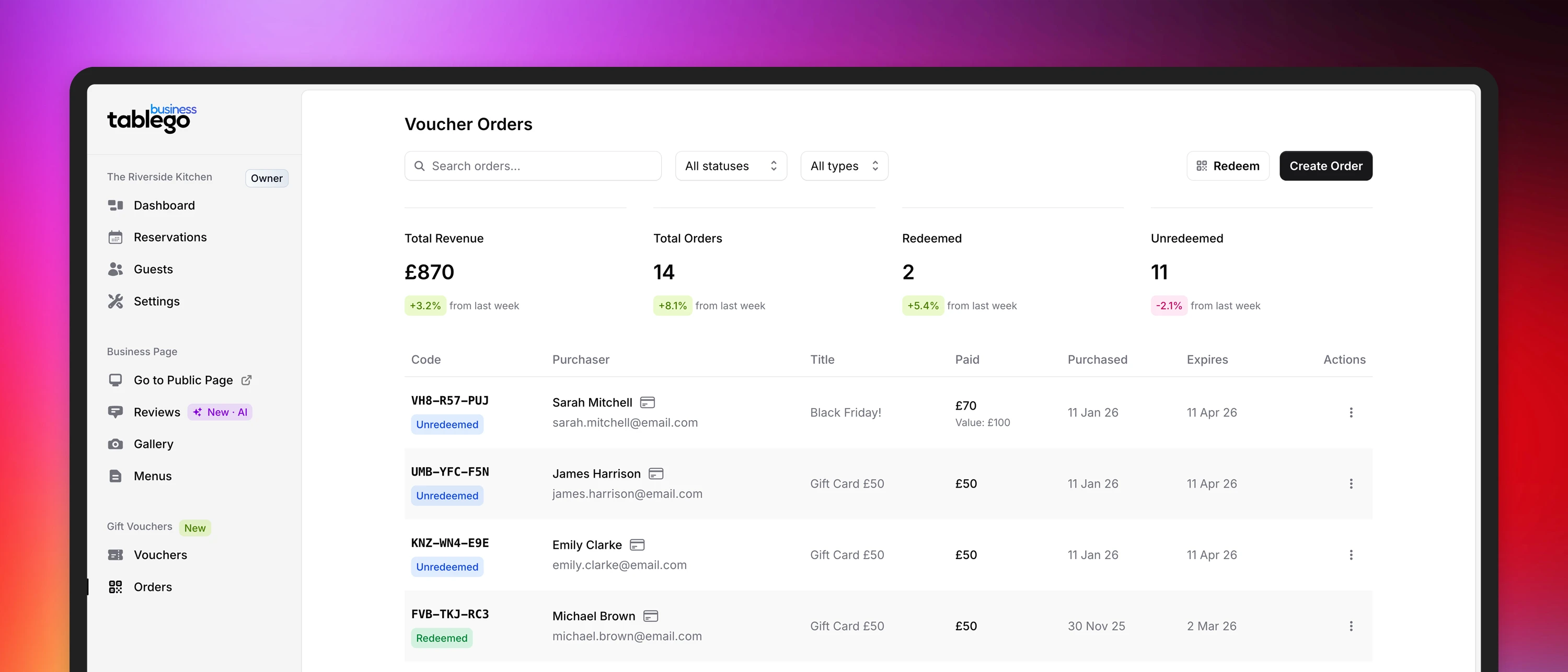
- Guests buy through secure Stripe Checkout, and the recipient gets a PDF voucher by email
- Redeem in your dashboard, in full or part, with the balance tracked
Basic or Pro
Start on Basic. Move to Pro when the fee adds up.
Deposits and vouchers work on both plans. The difference is TableGo’s fee on the payments you collect, and Pro’s extra tools, including card guarantees.
Basic
Free
3.5% TableGo platform fee
Deposits, vouchers and the festive booking settings. The 3.5% applies to deposits and voucher payments you collect.
- Unlimited online reservations
- Deposits and gift vouchers
- Reservation policies, service periods, special hours and blocked dates
- Guest profiles and notes
Pro
£99 a month
0% TableGo platform fee
Everything in Basic, with no TableGo fee on those payments, plus card guarantees and the tools for a busier floor.
- Table management and multiple venues
- Card guarantees against no-shows
- Full guest database, tags and exports
- Reports and reservation analytics
- Staff logins, priority support and migration help
When does Pro cost less?
£99 is 3.5% of about £2,830. If you collect more than that in a month in deposits and voucher sales, TableGo’s fee on Basic is higher than Pro’s £99. If you collect less, Basic is the cheaper plan on fees alone.
Stripe’s card processing fees, for example 1.5% + 20p per UK card payment, apply on every plan and are separate from TableGo’s fee.
TableGo’s fee on Basic, for example
| Collected in a month | Basic fee (3.5%) |
|---|---|
| £1,000 | £35 |
| £3,000 | £105 |
| £5,000 | £175 |
Plain arithmetic to show how the fee scales, not a forecast. Pro’s TableGo fee on these payments is £0, on top of its £99 a month.
After the festive rush
Still useful in January
Almost nothing here is specific to Christmas. Once the festive dates have passed, the same tools keep working.
Busy dates all year
Deposit rules work on any date or weekday, so Valentine’s Day, Mother’s Day, Easter and bank holiday weekends can be protected the same way.
Protect your busiest ordinary evenings
Set a weekly deposit, or a card guarantee on Pro, for the nights you fill, and leave the quiet ones open.
Gift vouchers that keep selling
Birthdays, anniversaries and Mother’s Day all send guests looking for a voucher, and you can sell them from your TableGo page all year.
A guest list that grows
Every booking adds to a guest profile with visit history, tags and notes, so you know your regulars when the rush is over.
Questions owners ask
Before you set up
Are deposits and gift vouchers only available on Pro?
No. Deposits and gift vouchers are available on the free Basic plan, with a 3.5% TableGo platform fee on the payments you collect through them. Pro is £99 a month with a 0% TableGo platform fee, and adds card guarantees and table management. Stripe’s card processing fees apply on every plan.
Do I need a Stripe account?
Yes, to take deposits, save cards or sell vouchers. You connect your own Stripe account from the Payouts page in TableGo, and you can create one for free. Stripe may ask for business and bank details before you can take payments. Until your account can take charges, guests can’t complete a booking that needs a deposit or a card, so connect it before you switch festive rules on.
Can I charge a different deposit on Christmas Eve from a normal Saturday?
Yes. Rules can apply to a specific date, a date range or certain weekdays, and when they overlap the most specific rule wins. A Christmas Eve rule beats a December rule, which beats your usual weekend rule.
How do I handle large festive parties?
Set your minimum and maximum party size, the notice you need and a longer dining time for larger parties. You can also require a deposit from a party size you choose, or a card guarantee on Pro. Online bookings follow the limits you set.
What happens to a deposit if the guest cancels?
You choose per rule. A non-refundable deposit isn’t returned. A refundable deposit is refunded automatically when the guest cancels before your guest cancellation cut-off. If the refund can’t be completed, the booking stays confirmed so you can sort it out with the guest.
Will my existing bookings move across automatically?
No. Existing future bookings don’t transfer on their own. Many restaurants set up TableGo for their festive dates first and leave current bookings where they are. We’ll talk through the safest approach for you in the demo.
How long does setup take?
Setting up hours, booking rules and deposits is self-service, and a booking page can be live the same day. Connecting Stripe is the step that depends on Stripe’s checks, so start it early.
Is there a contract?
No contract, no setup fee and no cancellation fee. Basic is free. Pro is £99 a month, billed monthly, and you can cancel anytime.
I’m a diner looking for a Christmas table. Can I book here?
No. This page is for restaurant owners. To book a table, contact the restaurant directly or use the booking link on its own website.
See your festive bookings running in TableGo
Give us 15 minutes on a video call. Tell us your festive dates, party-size limits and deposit plans, and we’ll show you how they’d be set up.
- Start on the free Basic plan, and move to Pro whenever it suits you.
- Month to month. No setup fee, no cancellation fee.
- Connect Stripe early, because deposits and vouchers need it.