Reservation Management
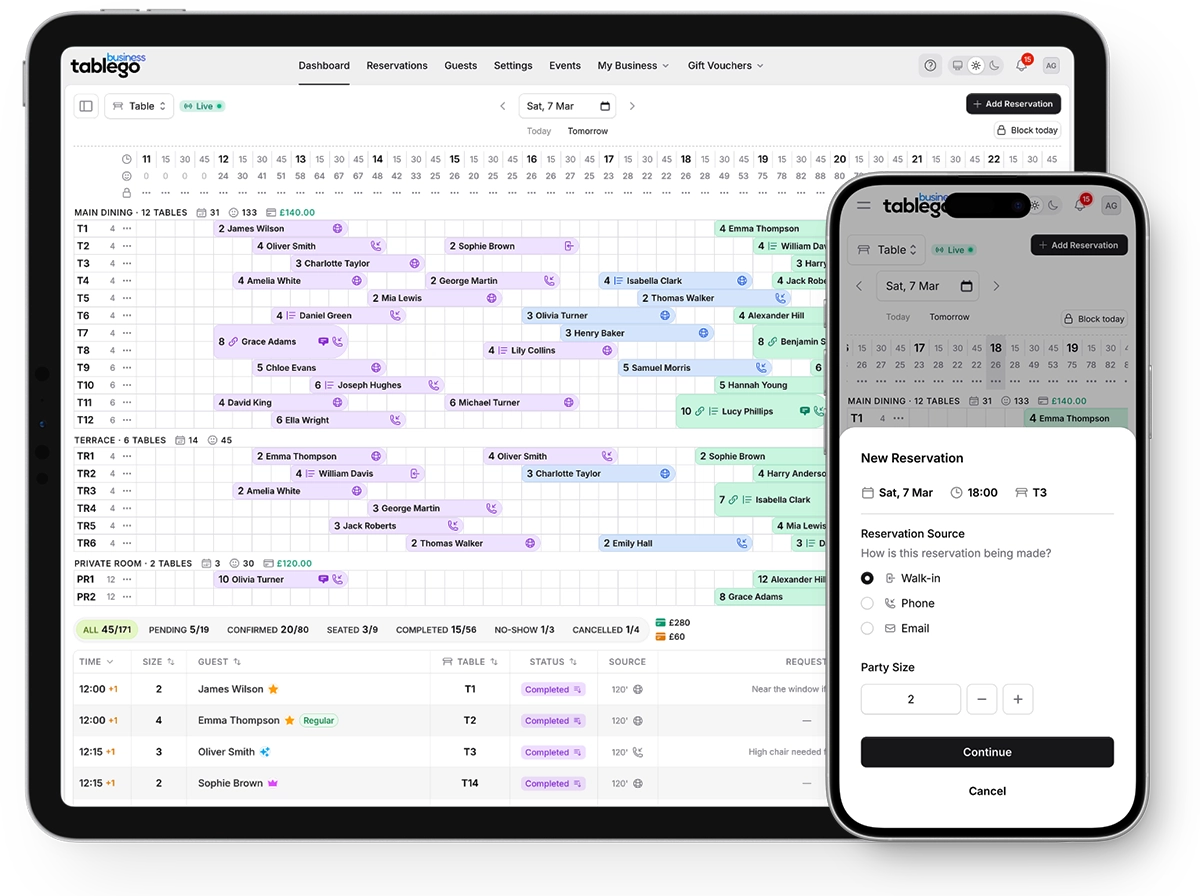
Manage all your restaurant bookings from one intuitive dashboard. Accept online reservations around the clock, embed the widget on your website, and keep your service running smoothly with real-time updates.
Last updated: 11 Jun 2026
Key benefits
A quick overview of what you get with reservation management.
See your daily covers at a glance with the live timeline view
How it works
Set your availability
Configure your operating hours, party size limits, and how far ahead guests can book. Set up blocked dates for holidays or private events.
Embed or share your booking widget
Add the booking widget to your website with a simple embed code, or share your free TableGo page link on social media and Google. When a guest completes a booking in the embed, TableGo can notify your page so your developer can send a conversion to Google Analytics, Google Ads, or Meta Pixel.
Receive and manage bookings
New reservations appear instantly in your dashboard. Confirm, modify, or cancel bookings with a few clicks. Guests receive automatic email updates.
Track your service
Use the timeline view to see your covers at a glance. Mark guests as seated when they arrive, and completed when they leave.
Frequently asked questions
Can I track widget bookings in Google Analytics or Meta?
Yes. When you embed the TableGo widget on your website, TableGo sends a browser event when a reservation is fully confirmed. Your web developer or agency wires that into Google Tag Manager, GA4, Google Ads, or Meta Pixel. Full setup guide: https://business.tablego.uk/help-center/widget-conversion-tracking
Can I take bookings while I'm closed?
Yes! Your booking widget is available 24/7. Guests can book anytime, and you'll see new reservations when you open your dashboard.
How do guests receive their confirmation?
Guests receive an instant email confirmation with their booking details and a link to manage their reservation (modify or cancel within your policy).
Can I manually add walk-in or phone bookings?
Absolutely. You can create reservations directly from the dashboard and mark the source as Phone, Walk-in, or Internal for your records.
What happens if a guest doesn't show up?
You can mark reservations as No-Show. This is tracked in the guest's profile so you can identify repeat offenders.
Ready to try reservation management?
Create your free account today. No credit card required.